
FOR FUNCTIONAL HEALTH PRACTITIONERS
Clients Bringing You Function Health Results?
Turn their existing blood work into a visual, bio-individual analysis you can review, personalize, and explain.
No credit card required. For practitioner use.
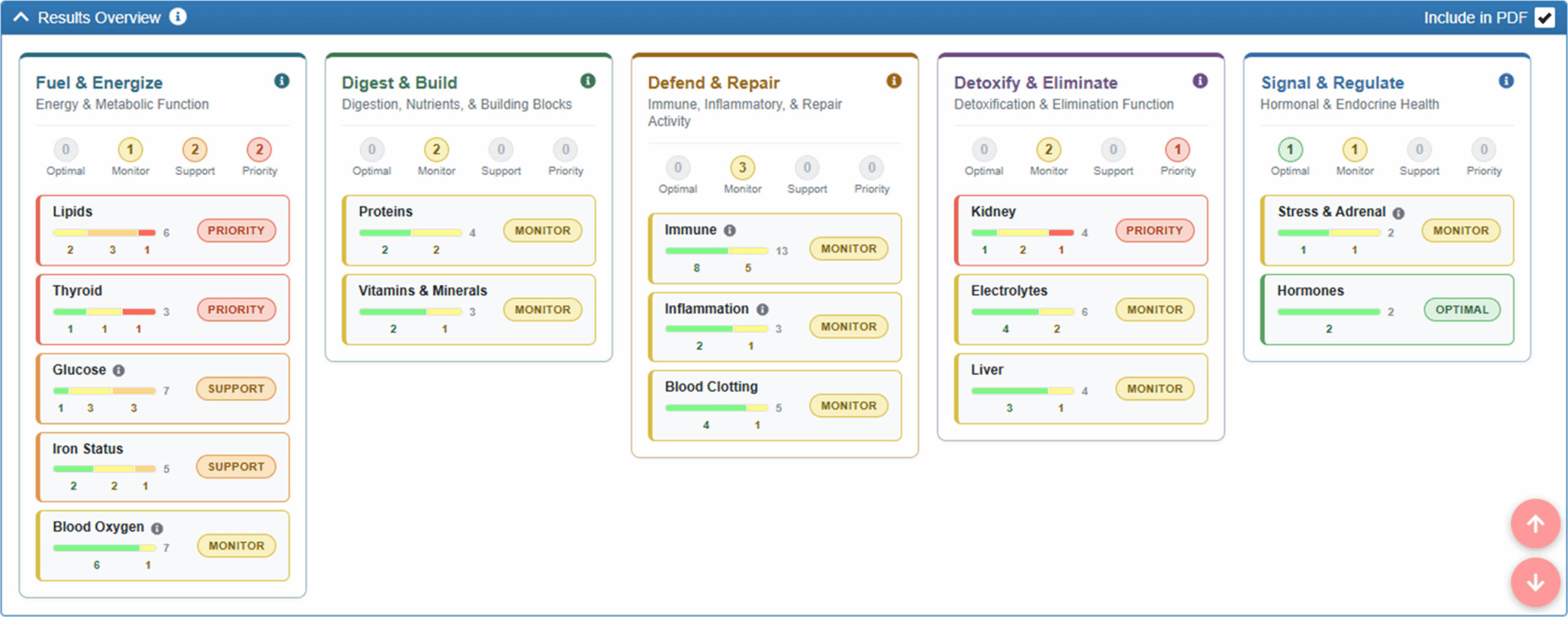
USE THE BLOOD WORK THEY ALREADY HAVE
From a client’s PDF to your interpretation workflow.
Bring supported Function Health results into LabSmarts, add the client’s physiological context, and start your review without retyping every supported value.
01 / UPLOAD
Bring in their results
Upload the supported Function Health All Biomarkers PDF format. Review the imported values against the original report.
02 / INTERPRET
See the patterns in context
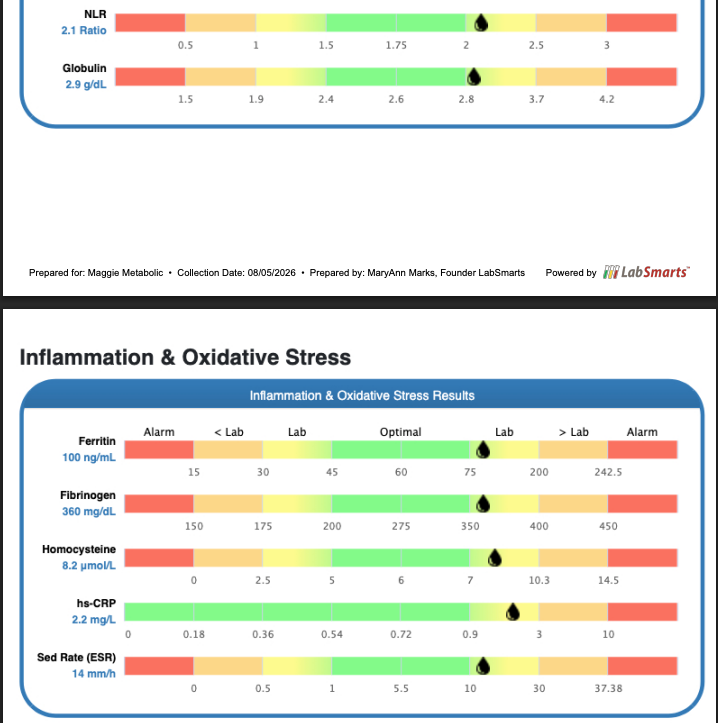
Explore relevant bio-individual ranges, functional systems, and connected biomarker insights to guide your review.
03 / SHARE
Make the findings understandable
Add practitioner notes and create a visual report. When follow-up results are available, compare tests to see what changed.
YOUR CLINICAL PERSPECTIVE MATTERS
Bring the person into the interpretation.
A lab result is one part of the picture. LabSmarts applies relevant range adjustments using the client details you provide.
Physiological Context
Relevant adjustments for age, sex, pregnancy trimester, menstrual phase, menopause, elevation, BMI, and other client factors.
Connected Patterns
Review relationships between supported markers and the systems they inform.
Your Approach
Add custom markers, ranges, sections, and practitioner notes.
Evidence to Explore
Access supporting citations and further considerations during your review.
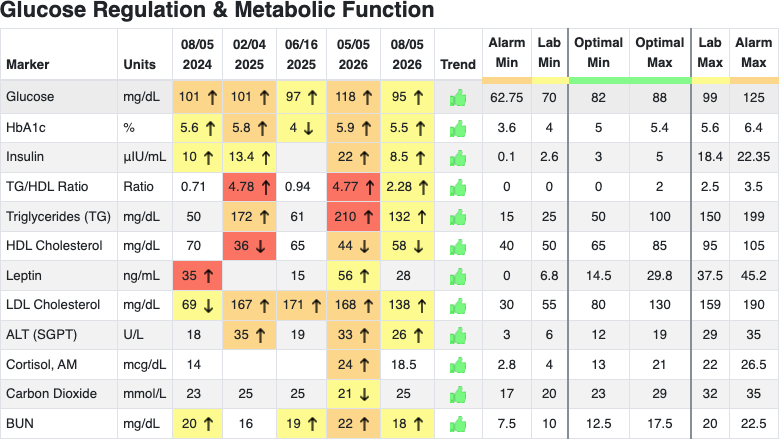
MAKE FOLLOW-UP MEANINGFUL
Help clients see what is changing
Compare results across tests, review shifts in supported markers, and use visual reports to support a clearer follow-up conversation.
Keep your existing lab-ordering workflow. LabSmarts helps you interpret supported results your clients already have, whether you ordered the testing or they obtained it themselves.
BEFORE YOU START
A few practical questions.
Which Function Health report can I upload?
Use the supported All Biomarkers print-to-PDF format. Check the sample format on our upload page before uploading. File layout matters for direct PDF import.
Does LabSmarts interpret every Function Health biomarker?
LabSmarts includes 150 built-in biomarkers and calculations. Built-in interpretation applies to supported markers and available patterns. My Markers & Sections lets you add custom markers and ranges; adding a custom marker does not create the same automated pattern interpretation as a built-in marker.
What if my client sends a scan, photo, or another PDF format?
Use the AI-to-CSV workflow and review extracted values before importing. Use an AI assistant your practice is permitted to use for client health information. Original reports may contain identifiable client health information.
What is included in the free account?
Try two blood work analyses, including visual analysis and PDF reports, without a credit card. Use them to evaluate how LabSmarts fits your practice before choosing a paid plan.
Is this a Function Health integration or partnership?
LabSmarts is an independent platform that supports uploading compatible Function Health reports. It is not affiliated with or endorsed by Function Health.
Does LabSmarts make a diagnosis?
No. LabSmarts uses non-diagnostic language to support practitioner interpretation. Review findings alongside the client’s history and other information, within your professional scope.
Put your client’s existing labs to work.
Try a supported Function Health report in LabSmarts and see how it fits your interpretation process.
No credit card required.